Finding logged data through filtering
The Event Log shows a list of all events logged as a result of either user actions or Certificate Manager - SaaS operational activities.
You can narrow that list by entering your own search text. For example, enter a specific user name to see all events that include that user within the event text, or enter the search term login to show only those items that include "login".
You can also select and combine one or more pre-built filters to filter out logged events that don't match your criteria.
To filter event logs using pre-built filters
- Sign in to Certificate Manager - SaaS.
- Click Settings > Event Log.
- Click +, and then select one or more filters from the list.
- Click each filter's drop-down list to select one or more sub-filters.
- After you've added the filters you need, click Apply Filter.
Example: Filtering for failed login attempts
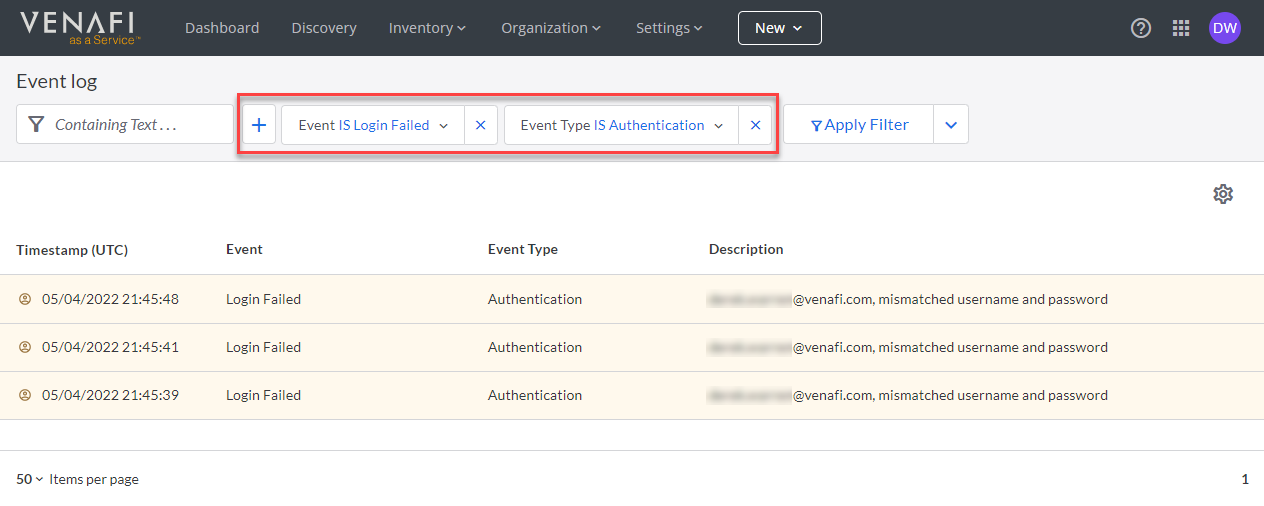
Available filters
| Filter | Accepted values | Use it to |
|---|---|---|
| Criticality | 0 (informational) or 1 (important) | Separate routine activity from events that warrant attention, such as login failures or password changes. |
| Description | Free-form text | Find a user name, an IP address, or any other text that appears in the event description. |
| Event | Any event name. See Event log filter values. | Narrow the log to one specific kind of event. |
| Event Type | Any event type. See Event log filter values. | Narrow the log to a whole category of activity, such as Certificates or Provisioning. |
| Timestamp | 7, 14, or 30 days | Limit results to events recorded in the last 7, 14, or 30 days. |
The Event Type and Event filters work together. Because the same event name can appear under more than one event type, an event is identified by the combination of the two. Selecting an event type first narrows the Event list to the events that belong to it.
Common filter combinations
| Event Type | Event | What the results show |
|---|---|---|
| Authentication | Login Failed | Recent login failures, and the users who experienced them. |
| User Security | ApiKey Created | API keys that were created, with a timestamp. |
| Users | User Role Changed | User role changes, indicating the new role names. |
| Applications | Application Deleted | Applications that were deleted, and who performed the action. |
| Certificates | Certificate Issued | Certificates that were issued, and who they were issued to. |
| Certificates | Certificate Retired | Certificates that were retired. |
| Certificates | Certificate Validation Finished | Completed certificate validations, including validation status. |
| Provisioning | Machine Created | Machines that were created, showing the user who performed the action and the machine's name, ID, and type. |
| Provisioning | Machine Identity Provisioning Started | Machine identities that have entered provisioning, showing the user who performed the action and the machine involved. |
| Discovery | Machine Discovery Failed | Machine discovery errors and their possible causes. |
What's next
- See the full list of event types and event names you can filter on.
- Export your filter results to an API endpoint or a file.